Every small business owner knows the feeling. You're mid-conversation with a customer, your phone buzzes with three WhatsApp messages, and by the time you get to them two hours later, the opportunity to respond promptly has gone.
You did not delay because your service is bad. You were busy doing the work.
Many businesses do not measure the enquiries that arrive outside working hours, during another appointment or just before a weekend. That makes the cost of delayed response difficult to see.
I know the operating problem directly because I run a community badminton club with roughly 3,000 contacts and weekly sessions across multiple West London venues.
The current workflow handles more than 1,100 WhatsApp messages in a typical week and automates common RSVP paths while logging uncertain cases for review.
Why most WhatsApp "automation" fails
Before I explain what works, it's worth understanding why the obvious solutions don't.
The WhatsApp Business App gives you greetings, away messages, and quick replies, but no real conditional logic or business-system integration.
SaaS platforms can help, but they often charge per conversation or per seat and still leave you dependent on their product limits and templates.
What I wanted was different: a system I own, on infrastructure I control, that can understand what people mean and respond without sounding like a chatbot.
The architecture: four moving parts
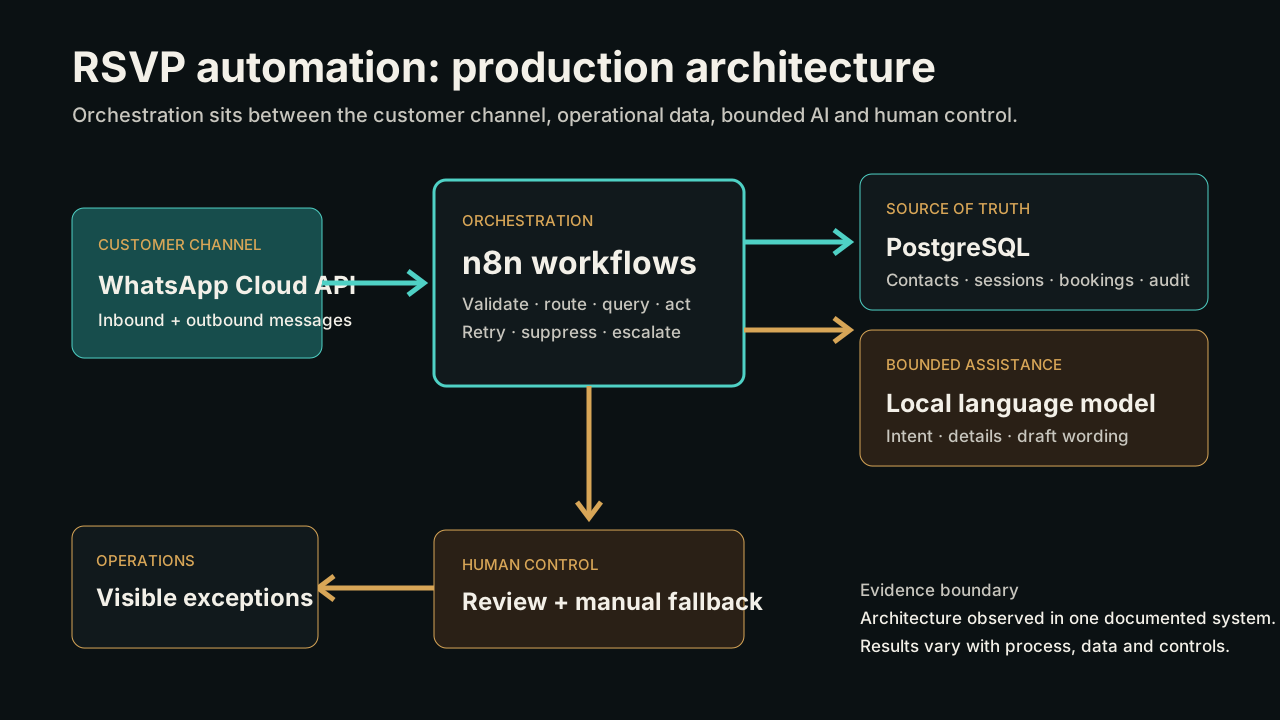
The system has four components. None are exotic. The leverage comes from how they connect.
1. WhatsApp Business API (via Meta Cloud API)
This is the pipe. It receives incoming messages via webhook and sends outgoing messages via API.
2. n8n (self-hosted workflow automation)
This is the brain. n8n receives the webhook, routes the message through processing logic, queries the database, calls the AI, and sends the reply.
We self-host n8n on Docker behind a Cloudflare Tunnel so the system is reachable without exposing the local network directly.
3. PostgreSQL (contact database)
Every contact, every booking, and every message lives in PostgreSQL so the workflows have real operating context.
4. Local AI (Ollama running Qwen on a Mac Mini M4)
This is what makes the replies feel human. The model classifies intent, extracts details, and generates a natural response.
Running it locally keeps costs down and avoids sending every message to a third-party AI API.
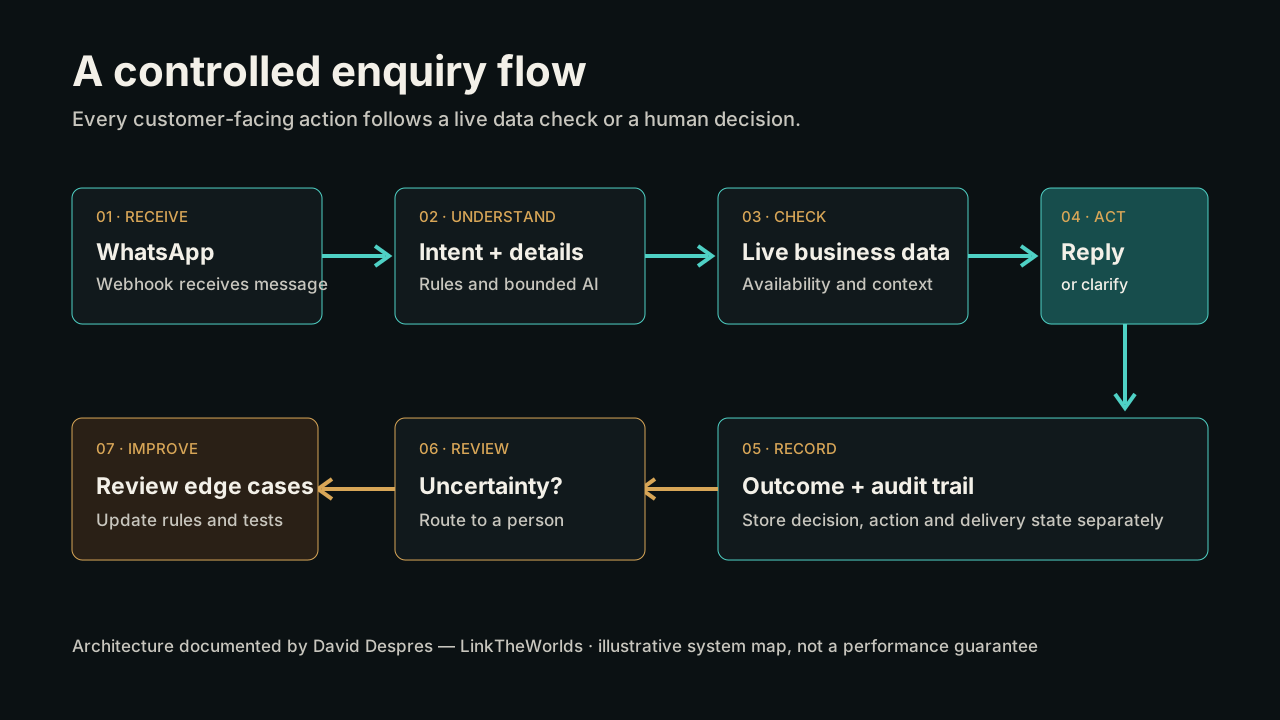
How a typical booking actually flows
Here is what happens when someone sends “Hi, can I book 2 places for Thursday badminton?”
-
01
WhatsApp delivers the message to the webhook endpoint through Meta Cloud API.
-
02
n8n receives the webhook and extracts the sender and message text.
-
03
The workflow queries PostgreSQL for contact and booking context.
-
04
The message and context are sent to the local AI with a structured classification prompt.
-
05
The model returns intent, extracted details, and a natural confirmation or clarification response.
-
06
n8n writes the result to PostgreSQL and sends the reply through the WhatsApp API.
-
07
If the session is full, the same logic can branch into waitlist handling.
Total elapsed time from message received to reply sent is usually about 4-6 seconds, which feels natural in a WhatsApp conversation.
The self-improving loop
This is the part most guides skip. Getting version one working is relatively straightforward. Making it reliable over months is the real work.
Every message gets logged with classification, extracted data, and generated response. Edge cases are reviewed and folded back into prompts or routing logic.
- "Can I bring my mate?" was initially treated as a general question rather than a booking for two.
- "Not this week" was initially treated as a cancellation of all future bookings rather than the next session.
- Voice notes now trigger a polite text-only fallback.
- Emoji-only confirmations now map to explicit intent handling.
Over six months, that process brought the misclassification rate down from roughly 15% to under 3%.
What this costs to run
Real operating numbers matter more than polished marketing estimates.
| Component | Monthly cost |
|---|---|
| WhatsApp Business API (Meta Cloud) | £0-15 |
| n8n (self-hosted on Docker) | £0 |
| PostgreSQL | £0 |
| Ollama + Qwen model | £0 |
| Cloudflare Tunnel | £0 |
| Mac Mini M4 (electricity) | ~£3 |
| Total | £3-18/mo |
A SaaS platform may include hosting and support that this estimate excludes, so compare like with like: message charges, seats, hosting, monitoring, maintenance and operator time. For this system, self-hosting keeps the listed infrastructure cost low, while setup and ongoing responsibility remain the main trade-offs.
Would this work for your business?
This architecture is not specific to badminton clubs. The same pattern works for any business receiving repetitive enquiries via WhatsApp.
Clinics & practices
Appointment request comes in, the system checks availability, and responds with confirmation or alternatives.
Estate agents
Property enquiry arrives, listings are checked, and the system replies with details or viewing options.
Trades
Quote request comes in, the workflow gathers job details and either returns a rough estimate or schedules a callback.
Gyms & studios
Class or membership questions route into schedule and availability logic instead of manual inbox triage.
The key principle is always the same: understand what the person is asking, check your data, and respond with something specific and helpful.
The three things to get right
If you are thinking about building something like this, whether yourself or with a consultant, focus on these three things.
Get the intent classification right first.
Before you worry about polished AI prose, make sure the system correctly identifies whether the person is booking, cancelling, asking a question, or raising an exception.
Anti-spam pacing matters.
WhatsApp will throttle numbers that send too aggressively, so batching and pacing need to be built into the workflow.
Always have a human fallback.
The best systems automate the obvious 80-85% and escalate uncertainty. A careful fallback is better than a confident wrong answer.
Methodology and evidence boundary
This article is a first-person account of a system David Despres designed and operates for a West London community organisation. The 3,000-contact figure describes the approximate contact database. The 1,100+ message figure is a typical weekly operating volume observed in the workflow records, not a guaranteed minimum.
The 4–6 second response time describes the common text-booking path under normal operating conditions. The classification figures compare an initial manual review estimate of roughly 15% misclassified messages with a later review showing under 3% after six months of correcting recurring edge cases. The figures have not been independently audited and should not be generalised to another organisation without a comparable test.
Monthly costs are an operating estimate for the listed self-hosted components at the time of writing. They exclude implementation, maintenance, broadband and existing hardware purchase. Meta pricing and infrastructure costs can change.
Frequently asked questions
Can WhatsApp automation understand natural language?
It can classify common intents and extract details, but ambiguous or sensitive messages should be clarified or sent to a person.
Does the system need n8n?
No. n8n is the orchestration layer in this implementation; another workflow platform or custom service could perform the same role.
Can the AI confirm a booking by itself?
The AI can help interpret the message, but confirmation should follow a successful check against authoritative booking and capacity data.
What should be measured after launch?
Track classification quality, response time, exceptions, duplicate prevention, business outcomes and confirmed delivery separately.
Sources and further evidence
Losing enquiries you shouldn't be?
Book a free 30-minute automation audit. We'll look at your current enquiry flow, identify what is falling through the cracks, and work out whether WhatsApp automation makes commercial sense.